


































Understanding Terms Used in the Hipposerve® Studio Knowledge Base
Throughout the Hipposerve® Studio Knowledge Base, we use a number of common terms to describe different parts of the website builder interface. This guide explains what those terms mean, where to find them and how they are used while building your website.
Once you become familiar with these names, following tutorials and guides becomes much easier. Think of this article as your quick-reference map to Hipposerve® Studio.
 Common Terms Used in Hipposerve® Studio
The following terms are commonly used throughout our Knowledge Base articles and tutorials:
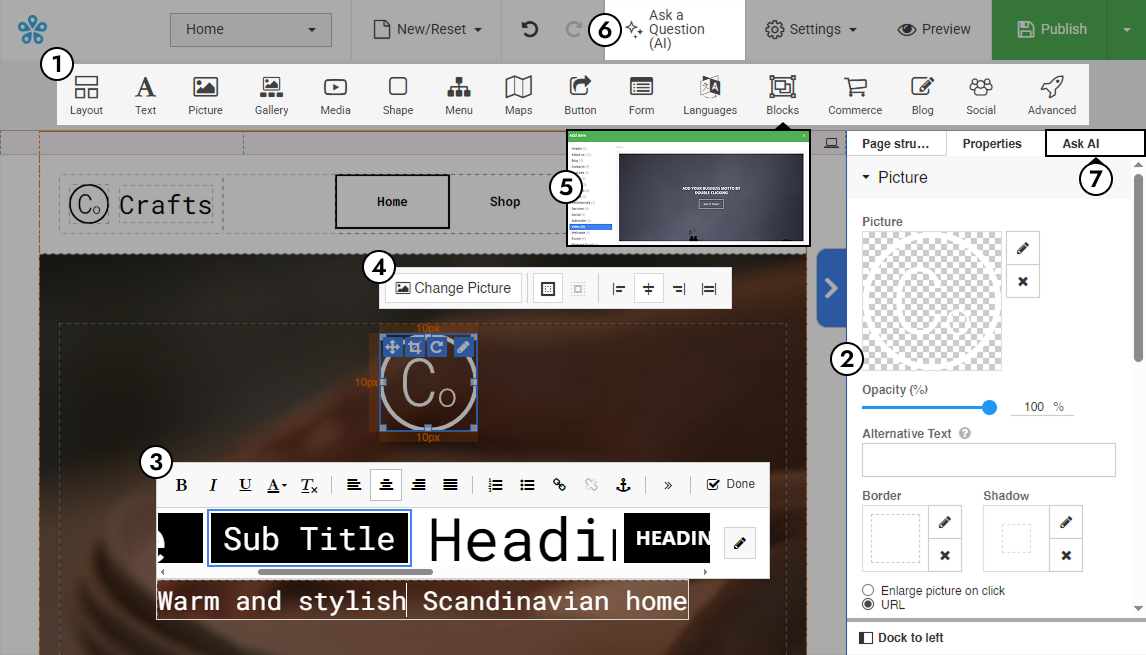
- Main Toolbar
The primary panel containing the main website building elements and controls. - Elements
Individual building blocks such as text, images, buttons, galleries and contact forms that can be added to your page. - Right Toolbar
The settings panel displayed on the right-hand side of the builder where styles, spacing and configuration options appear. - Rich Text Editor
The advanced text editing interface used for formatting headings, paragraphs, links, colours and other text options. - Context Toolbar
A floating toolbar that appears when you click on an element, providing quick access to editing tools. - Composition
A pre-designed layout or content structure that helps you quickly build sections of your website. - AI Knowledge Base Assistant
The built-in AI assistant that helps answer questions and guide you while using Hipposerve® Studio. - AI Builder Assistant
AI-powered tools designed to help generate layouts, content and website ideas faster.
 Preview of the Builder Interface
The image below highlights the main sections of the Hipposerve® Studio interface referenced throughout the Knowledge Base. Depending on your plan, the images in the site builder may look slightly different, but all elelments will be present.
 Terms Used in the Hipposerve® Studio Platform
You may also see the following terms and icons used throughout the Hipposerve® Studio platform and customer portal:
- Manage Button
Opens the settings and configuration area for your website or hosting service. - Server IPs
The public IP addresses used by your hosting infrastructure and connected services. - Hosting Panel / Billing Portal
The customer area used to manage websites, hosting services, billing and domains.  Settings Icon
Used to configure branding, builder settings and platform options. Edit Icon
Used to edit website settings, content or branding elements. Users Icon
Used to share website access or collaborate with additional users.- Tools Icon
Used to configure domain, email and website management settings.